 Video Pencil

Make it obvious.
Draw it
Draw over any video or your camera, pause where it matters and record what you mean, right on your iPad.
Free to download. One-off upgrades, yours for life: remove the watermark $39.99, Action Replay $19.99, or Lifetime Updates $99.99 for every current and future feature that isn't a subscription.

Making videos
Tutorials, reviews and walkthroughs, with your drawings and your voice together. No editing.

Teaching
Walk through a diagram, a worked example or an experiment, step by step.


Want to draw live? Video Pencil also connects to your Mac or PC for Zoom, Teams, OBS and Ecamm Live.

On your iPad

Everything you need to explain a video, or to draw live over your camera, without another device.

Customisable drawing tools, curated for drawing on video
Every tool is chosen to stand out clearly on top of moving pictures, so what you draw is easy to follow.
Set up your favourite pens and colours so they're always one tap away, and switch between them without breaking your flow.
Every line responds to Pencil's tilt and pressure, with the precision you expect.


Take people through a video
Load any video from your library, play or pause and scrub to the perfect moment.
Then just start drawing.
Or switch to your iPad's camera and draw over it live.
“This allows me to get the video onto the iPad from the camera, scrub through it, play, pause, mark and then go on… It was MUCH faster to learn.”
Spotted in the wild
Harry Kane, on Bayern Munich's channel
Harry Kane uses Video Pencil for tactical analysis in a video on Bayern Munich's official YouTube channel.
Not an endorsement, but a nice sign that the tools hold up at the highest level.

New in Video Pencil 2.1
Football Toolkit
Made with coaches, from professional clubs to youth and grassroots teams.
- Tap a player to highlight them, and the highlight follows them around the pitch

- Drag from one player to another to draw a line that stays connected as they move

- Label players, draw arrows for runs and passes, and scrub with the shuttle wheel
- Record the whole breakdown with your voice, ready to share with the team


An in-app subscription: $19.99 a month or $149 a year.
“Best app out there for film day for coaching that isn’t $600. Love it!”
Action Replay
Pause and rewind any live camera: your iPad's own camera, a USB camera or any NDI feed. On a Mac, anything you share through CueCam can be rewound too.
Jog the Shuttle Wheel back to the moment, and draw on it frame by frame while the live feed keeps playing picture-in-picture. A rolling buffer, from 5 seconds to 10 minutes, means you won't run out of storage, and you can save the best moments as clips.
- Sport: replay what just happened at training, or send an NDI feed from your switcher and cut to telestrated replays on a live stream
- Classrooms and labs: point your iPad at an experiment, or plug in USB cameras such as microscopes, and replay what you just saw
- Remote coaching: share your client's Zoom window through CueCam, then run back through their performance, drawing as you go
A one-off purchase, $19.99. Included with a CueCam Presenter subscription.
Live Titles
When you're in full flow, there's no need to stop and slowly write text.
Just draw a line, say what you want it to say, hold for a moment, and your text appears.
The text will automatically fit the length of your line, so you can go as small or big as you like.

Office supplies
Available in-app

Laser Pointer
Point at what matters without drawing on it.

Sparkle Wand
Rainbow sparkles for when something deserves a little magic.
In the room
Show it on a TV or projector.

On the big screen
In the classroom, the team talk or the clubhouse: put your iPad on the TV or projector and show everyone exactly what you mean, close-up.
Use an Apple TV or AirPlay, or plug in an HDMI adapter.
The big screen shows only the footage and your drawings. The toolbar and the rest of Video Pencil stay on your iPad, so everyone sees a clean picture.
“Me being able to hook up the iPad to a TV is a game changer. Slow-mo or fast-forward and the ability to write and talk text is awesome while showing film.”
Sports teams
At training, at half-time or in the team meeting: put the footage on the big screen and show the whole squad what happened, and what should have.
- Shuttle Wheel: move through the footage frame by frame, pause, zoom and rewind
- Action Replay: rewind the live video and replay the moment while it's still fresh
- Football Toolkit: highlight players, link them with lines and draw the runs
“I have been coaching youth soccer for 15+ years… I use Video Pencil connected via HDMI to a TV in the classroom for live game film review and I use the recording feature to create clips for the team or specific players. I could not do what I do without Video Pencil.”
Your own branding
Make it look like your club, school or business on every screen.
- A placeholder background of your choice for when the camera is off

- A watermark over everything you show, so every video you record and share carries your logo or crest

Medical Teaching
Watch eye surgeon Jim Innes use Video Pencil with a magnetic table system for teaching.

On your Mac
With CueCam Presenter for Mac
Draw on your webcam in any call
CueCam puts Video Pencil into Zoom, Teams, Google Meet and anything else that uses a camera. You draw on your iPad, and everyone sees it over you, live.
- Draw: on your webcam, from your iPad.
- Share: pictures, videos and slides on screen with one key, and draw on those too.
- Shows: line it all up with your script, and step through it with one button.
Michael moves between slides, plays a video with picture-in-picture, and draws on it from his iPad with Live Titles.
“Video Pencil has fundamentally changed the way I teach, lead, present and interact with my audience in Zoom. Being able to see my program output in Video Pencil on my iPad and then telestrate right on the screen is HUGE!”
Does it also work on a PC? +
Yes. Video Pencil shows your PC's webcam on your iPad. You draw over it, and everyone in the call sees your drawing on top of you.
You'll need a virtual camera on your PC, which you pick as your camera in Zoom, Teams, Google Meet or any other app.
Can I connect it another way? +
You can connect Video Pencil over HDMI to any Mac, PC or video hardware: a YoloBox, a Blackmagic ATEM switcher, an Elgato Cam Link, or a streaming backpack.
Connect with AirPlay to any Mac, PC or Apple TV.
You can connect directly over USB to any Mac.
And Video Pencil can send and receive NDI feeds. This means you can connect it to any number of professional and consumer video hardware and software devices.

Live streaming
Draw live in OBS, Ecamm Live and mimoLive.
The deepest integration is through CueCam Presenter on your Mac. It brings in Video Pencil, sends your drawings on as a transparent layer over Syphon or NDI, and controls your streaming app, so one button steps your whole show forward.
“I used Video Pencil with Ecamm and I loved what I could do. So easy to use. I could actually see where I was drawing on the screen. I did a session for grades 1 and 2 students about how shapes can be the building blocks for faces and they were over the moon with the demonstration.”
OBS · free and open source +
Add your drawings to OBS as a transparent layer on top of your scenes. With CueCam, your show's cues can control OBS too, so you're not reaching for the mouse mid-stream.
Ecamm Live · the Mac favourite for live shows +
Draw on your Ecamm show, live, from your iPad: your camera, your screen share, or anything else in your scene.
CueCam Presenter handles the connection, and it's free to use this way. It finds Video Pencil on its own, sends your Ecamm program back to the iPad so you can see what you're drawing on, and hands Ecamm a clean transparent layer over Syphon. It can also switch Ecamm scenes as you step through your show.
Or connect directly over NDI, without CueCam.
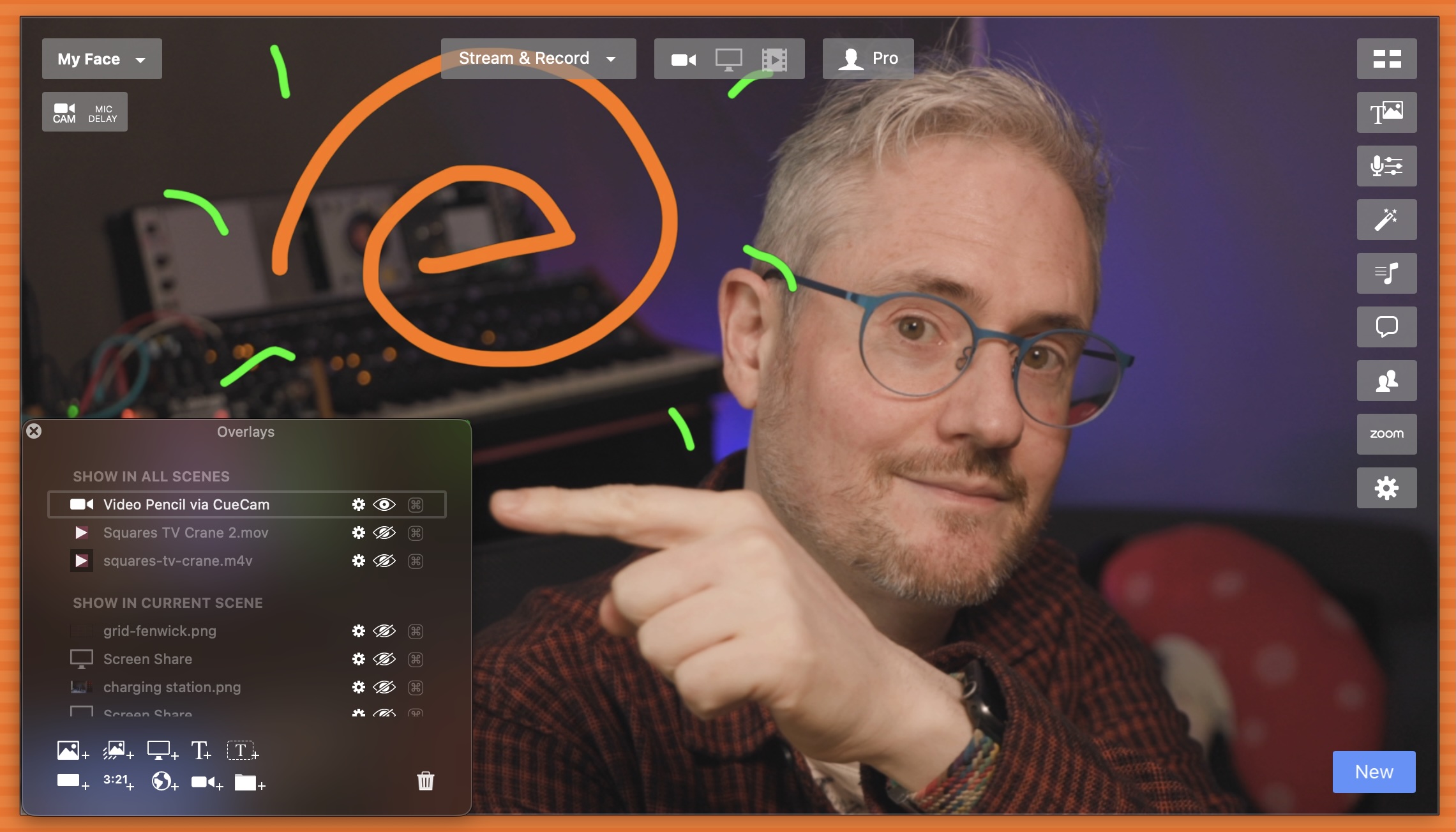
"Video Pencil is one of my “must have’s” when using Ecamm." Jeremy, in the Ecamm Facebook Community
For two months free
Ecamm Live Pro
use the code videopencil
mimoLive · pro live production on the Mac +
CueCam sends your drawings into mimoLive as a transparent layer over Syphon or NDI, and can control mimoLive from your show's cues.
Get started with mimoLiveTestimonials
What do people love about Video Pencil?
Have Telestrator, Will Travel. I can’t tell you how much fun I’ve had with this app and using it to diagram out sports plays, put online courses together with a more “human” touch, and go all-out telestrator mode live via Ecamm. This app is one of the best values out there and the customer service and response time is fantastic. Highly recommend for all educators and sports fans.
 BeGroovee, App Store review
One of my channel members suggested this app called Video Pencil which I had never heard of so I decided to try it live on stream and see what it could do. After the stream I was so excited that I had to come and make this video


Video Pencil, an innovative app for the iPad, enables you to annotate directly onto your screen during live streams and online meetings. Be it crucial notes or interactive doodles, your audience will see your on-screen markings as if they were overlaid on your camera feed, creating an immersive and engaging presentation experience.
Built in public
Video Pencil and everything else here on Squares TV is the work of a single developer, working in public.
You can influence what gets built next by joining the Squares TV Discord.
To see weekly financial reports follow Michael on Mastodon.
Available now!
Download for free and see how well it works for you.
for discounts and updates.